码到成功
YOLOv3 数据输入详解
## 源数据应该长什么样
YOLOv3 训练前,通常需要两类数据:
- 图片文件
- 标注文本
图片可以放在任意目录,只要标注文件里能写对图片路径即可。例如:
```text
/data/VOC2007/JPEGImages/000073.jpg
/data/VOC2007/JPEGImages/000003.jpg
```
标注信息通常放在一个文本文件中,一行对应一张图片:
```text
/data/VOC2007/JPEGImages/000012.jpg 156,97,351,270,6
```
如果一张图片里有多个目标,就在同一行继续追加:
```text
/data/VOC2007/JPEGImages/000032.jpg 104,78,375,183,0 133,88,197,123,0 195,180,213,229,14
```
每个目标框由五个数字组成:
```text
xmin,ymin,xmax,ymax,class_id
```
含义分别是:
- `xmin`:目标框左上角 x 坐标
- `ymin`:目标框左上角 y 坐标
- `xmax`:目标框右下角 x 坐标
- `ymax`:目标框右下角 y 坐标
- `class_id`:类别编号
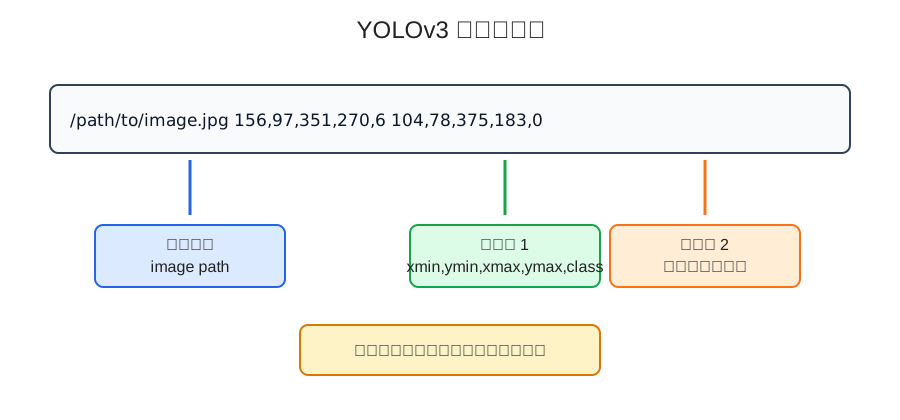
图像坐标系一般以左上角为原点,向右是 x 轴正方向,向下是 y 轴正方向。所以左上角是 `min`,右下角是 `max`。
## 用 Python 解析标注行
先写一个简单解析函数:
```python
def parse_annotation_line(line):
parts = line.strip().split()
image_path = parts[0]
boxes = []
for item in parts[1:]:
xmin, ymin, xmax, ymax, class_id = map(int, item.split(","))
boxes.append([xmin, ymin, xmax, ymax, class_id])
return image_path, boxes
line = "/data/VOC2007/JPEGImages/000012.jpg 156,97,351,270,6"
image_path, boxes = parse_annotation_line(line)
print(image_path)
print(boxes)
```
输出:
```text
/data/VOC2007/JPEGImages/000012.jpg
[[156, 97, 351, 270, 6]]
```
解析后,图片路径用于读取图像,`boxes` 用于后续坐标变换和 `y_true` 构造。
## 数据生成器做了什么
YOLOv3 训练时,数据生成器通常负责这些事情:
```text
读取一批标注行
读取图片
读取真实框
做数据增强
把图片变成固定输入尺寸
修正真实框坐标
根据 anchor 构造 y_true
yield 给模型训练
```
伪代码大概是这样:
```python
def data_generator(annotation_lines, batch_size, input_shape, anchors, num_classes):
n = len(annotation_lines)
i = 0
while True:
image_data = []
box_data = []
for _ in range(batch_size):
if i == 0:
np.random.shuffle(annotation_lines)
image, boxes = get_random_data(
annotation_lines[i],
input_shape,
random=True
)
image_data.append(image)
box_data.append(boxes)
i = (i + 1) % n
image_data = np.array(image_data)
box_data = np.array(box_data, dtype=object)
y_true = preprocess_true_boxes(
box_data,
input_shape,
anchors,
num_classes
)
yield [image_data, *y_true], np.zeros(batch_size)
```
这里 `yield [image_data, *y_true], np.zeros(batch_size)` 看起来有点奇怪。
原因是很多 Keras 版 YOLOv3 会把真实标签作为模型输入的一部分,再用自定义 loss 层计算损失。`np.zeros(batch_size)` 只是为了符合 Keras 训练接口形式,真正的训练目标已经放在 `y_true` 里了。
## 图片为什么要 resize 到固定大小
神经网络通常要求一个 batch 内的输入形状一致。
YOLOv3 常见输入尺寸是:
```text
416 × 416 × 3
```
但原始图片大小不一定一样,所以要进行缩放。
如果简单把图片强行拉伸到 `416 × 416`,目标比例可能会变形。
更常见的做法是 letterbox resize:
```text
保持原图宽高比例
缩放到能放进目标尺寸
剩余区域用灰色背景填充
同步修正真实框坐标
```
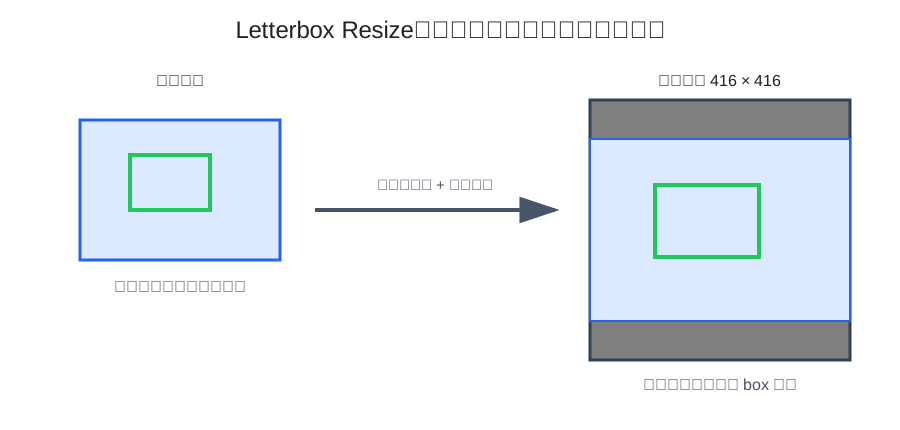
这种处理能尽量保留图像比例,减少目标形状被拉歪的问题。
## Python 实现 letterbox resize
下面用 PIL 写一个简化版本:
```python
from PIL import Image
import numpy as np
def letterbox_image(image, boxes, input_shape):
target_h, target_w = input_shape
image_w, image_h = image.size
scale = min(target_w / image_w, target_h / image_h)
new_w = int(image_w * scale)
new_h = int(image_h * scale)
resized = image.resize((new_w, new_h), Image.BICUBIC)
canvas = Image.new("RGB", (target_w, target_h), (128, 128, 128))
dx = (target_w - new_w) // 2
dy = (target_h - new_h) // 2
canvas.paste(resized, (dx, dy))
boxes = np.array(boxes, dtype=np.float32).copy()
if len(boxes) > 0:
boxes[:, [0, 2]] = boxes[:, [0, 2]] * scale + dx
boxes[:, [1, 3]] = boxes[:, [1, 3]] * scale + dy
image_data = np.asarray(canvas, dtype=np.float32) / 255.0
return image_data, boxes
```
这里有几个关键点:
- 图片使用等比例缩放
- 背景用灰色填充
- `xmin/xmax` 要乘缩放比例并加横向偏移
- `ymin/ymax` 要乘缩放比例并加纵向偏移
- 图片最后归一化到 `0~1`
## 数据增强在做什么
训练目标检测模型时,数据增强很常见。
常见增强包括:
- 随机缩放
- 随机裁剪
- 随机平移
- 随机水平翻转
- 颜色抖动
- 亮度、饱和度、色调变化
这些增强的目的不是炫技,而是让模型见到更多变化,降低过拟合风险。
但目标检测的数据增强有一个麻烦点:
```text
图片怎么变,框也必须跟着变
```
如果图片翻转了,框坐标也要翻转。
如果图片平移了,框坐标也要平移。
如果图片缩放了,框坐标也要缩放。
只增强图片、不修正 box,是目标检测数据管道里很常见的错误。
## 从真实框到中心点格式
原始标注通常是:
```text
xmin, ymin, xmax, ymax
```
但 YOLO 更关心中心点和宽高:
```text
x_center, y_center, w, h
```
转换公式:
```text
x_center = (xmin + xmax) / 2
y_center = (ymin + ymax) / 2
w = xmax - xmin
h = ymax - ymin
```
Python 示例:
```python
import numpy as np
def xyxy_to_xywh(boxes):
boxes = np.asarray(boxes, dtype=np.float32).copy()
xy = (boxes[:, 0:2] + boxes[:, 2:4]) / 2
wh = boxes[:, 2:4] - boxes[:, 0:2]
return np.concatenate([xy, wh, boxes[:, 4:5]], axis=1)
```
如果模型输入是 `416 × 416`,还可以把坐标归一化:
```python
def normalize_xywh(boxes_xywh, input_shape):
input_h, input_w = input_shape
boxes = boxes_xywh.copy()
boxes[:, [0, 2]] = boxes[:, [0, 2]] / input_w
boxes[:, [1, 3]] = boxes[:, [1, 3]] / input_h
return boxes
```
归一化后,坐标都落在相对比例空间里,更方便模型学习。
## anchor 是怎么匹配的
YOLOv3 通常使用多组 anchor。
每个真实框会找一个最适合自己的 anchor,常见依据是 IoU。
这里的 IoU 只比较宽高,不关心位置。可以把真实框和 anchor 都放到同一个原点,只看形状相似度。
IoU 公式:
```text
IoU = intersection_area / union_area
```
宽高维度下:
```text
inter_w = min(box_w, anchor_w)
inter_h = min(box_h, anchor_h)
intersection = inter_w × inter_h
union = box_area + anchor_area - intersection
```
Python 示例:
```python
import numpy as np
def wh_iou(box_wh, anchors):
box_wh = np.asarray(box_wh, dtype=np.float32)
anchors = np.asarray(anchors, dtype=np.float32)
inter_wh = np.minimum(box_wh, anchors)
inter_area = inter_wh[:, 0] * inter_wh[:, 1]
box_area = box_wh[0] * box_wh[1]
anchor_area = anchors[:, 0] * anchors[:, 1]
union = box_area + anchor_area - inter_area
return inter_area / np.maximum(union, 1e-12)
anchors = np.array([
[10, 13],
[16, 30],
[33, 23],
[30, 61],
[62, 45],
[59, 119],
[116, 90],
[156, 198],
[373, 326],
])
box_wh = np.array([80, 100])
iou = wh_iou(box_wh, anchors)
best_anchor = np.argmax(iou)
print(iou)
print(best_anchor)
```
匹配到最佳 anchor 后,就知道这个真实框应该写入哪个 anchor 通道。
## y_true 到底是什么
YOLOv3 是多尺度检测,通常会输出三个尺度。
如果输入是 `416 × 416`,常见三个网格尺寸是:
```text
13 × 13
26 × 26
52 × 52
```
每个尺度有 3 个 anchor。
所以 `y_true` 通常是一个列表,里面有三个数组:
```text
y_true[0]: batch × 13 × 13 × 3 × (5 + num_classes)
y_true[1]: batch × 26 × 26 × 3 × (5 + num_classes)
y_true[2]: batch × 52 × 52 × 3 × (5 + num_classes)
```
最后一维的含义是:
```text
x, y, w, h, objectness, class_one_hot...
```
如果类别数是 20,那么最后一维就是:
```text
5 + 20 = 25
```
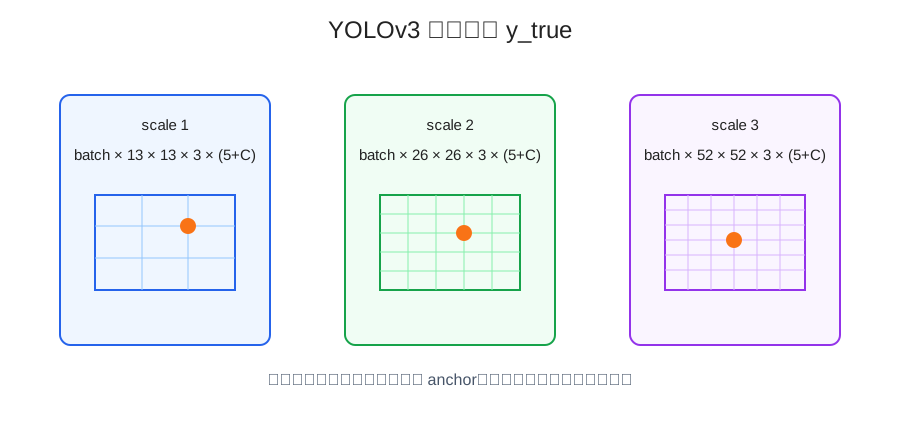
一个真实框会被写到某个尺度、某个 grid cell、某个 anchor 上。
具体位置由中心点决定:
```text
grid_x = floor(x_center * grid_w)
grid_y = floor(y_center * grid_h)
```
注意这里的 `x_center` 和 `y_center` 是归一化坐标。
## 简化版 preprocess_true_boxes
下面写一个简化版,帮助理解 `y_true` 是怎么构造的。
```python
import numpy as np
def preprocess_true_boxes(boxes_batch, input_shape, anchors, num_classes):
input_h, input_w = input_shape
num_layers = 3
anchor_mask = [
[6, 7, 8],
[3, 4, 5],
[0, 1, 2],
]
grid_shapes = [
(input_h // 32, input_w // 32),
(input_h // 16, input_w // 16),
(input_h // 8, input_w // 8),
]
batch_size = len(boxes_batch)
y_true = [
np.zeros(
(batch_size, grid_h, grid_w, len(anchor_mask[l]), 5 + num_classes),
dtype=np.float32
)
for l, (grid_h, grid_w) in enumerate(grid_shapes)
]
anchors = np.asarray(anchors, dtype=np.float32)
for b, boxes in enumerate(boxes_batch):
boxes = np.asarray(boxes, dtype=np.float32)
if len(boxes) == 0:
continue
boxes_xy = (boxes[:, 0:2] + boxes[:, 2:4]) / 2
boxes_wh = boxes[:, 2:4] - boxes[:, 0:2]
class_ids = boxes[:, 4].astype(int)
valid = (boxes_wh[:, 0] > 0) & (boxes_wh[:, 1] > 0)
boxes_xy = boxes_xy[valid]
boxes_wh = boxes_wh[valid]
class_ids = class_ids[valid]
boxes_xy_norm = boxes_xy / np.array([input_w, input_h])
boxes_wh_norm = boxes_wh / np.array([input_w, input_h])
for t in range(len(boxes_xy)):
iou = wh_iou(boxes_wh[t], anchors)
best_anchor = int(np.argmax(iou))
for l in range(num_layers):
if best_anchor not in anchor_mask[l]:
continue
grid_h, grid_w = grid_shapes[l]
i = np.floor(boxes_xy_norm[t, 0] * grid_w).astype(int)
j = np.floor(boxes_xy_norm[t, 1] * grid_h).astype(int)
k = anchor_mask[l].index(best_anchor)
c = class_ids[t]
i = np.clip(i, 0, grid_w - 1)
j = np.clip(j, 0, grid_h - 1)
y_true[l][b, j, i, k, 0:2] = boxes_xy_norm[t]
y_true[l][b, j, i, k, 2:4] = boxes_wh_norm[t]
y_true[l][b, j, i, k, 4] = 1
y_true[l][b, j, i, k, 5 + c] = 1
return y_true
```
这个版本省略了一些工程细节,但核心逻辑已经有了:
- 计算真实框中心点和宽高
- 坐标归一化
- 用宽高 IoU 找最佳 anchor
- 根据 anchor mask 找对应尺度
- 根据中心点落到具体 grid cell
- 写入位置、宽高、置信度和类别 one-hot
## 为什么 y_true 要拆成三个尺度
YOLOv3 用三个尺度检测不同大小的目标。
可以粗略理解为:
- 小网格负责大目标
- 中等网格负责中等目标
- 大网格负责小目标
这不是绝对规则,但方向大致如此。
因为大目标不需要特别细的网格也能定位,小目标则需要更细的空间分辨率。
所以 `y_true` 也要对应三个输出尺度构造。
如果模型有三个输出头,训练标签也要有三个尺度的真值,否则 loss 无法正确计算。
## 数据生成器最终 yield 的是什么
最终生成器一般会吐出:
```text
[image_data, y_true_13, y_true_26, y_true_52], dummy_y
```
其中:
```text
image_data: batch × 416 × 416 × 3
y_true_13: batch × 13 × 13 × 3 × (5 + C)
y_true_26: batch × 26 × 26 × 3 × (5 + C)
y_true_52: batch × 52 × 52 × 3 × (5 + C)
dummy_y: batch
```
`dummy_y` 通常没有实际训练意义,只是为了适配某些训练接口。
真正被 loss 使用的是:
```text
image_data + 三个尺度的 y_true
```
## 常见错误
标注路径写错。
图片路径不存在时,生成器会在读取阶段报错。建议训练前先遍历标注文件检查路径。
坐标没有同步变换。
图片做了缩放、平移、翻转,但 box 没跟着变,会直接污染训练数据。
坐标越界。
增强后部分框可能跑到图像外,需要裁剪到合法范围,并过滤掉宽高太小的框。
类别编号超出范围。
如果 `num_classes=20`,类别 ID 应该在 `0~19` 之间。
anchor 顺序和 mask 对不上。
不同代码实现里 anchor 顺序可能不一样,anchor mask 也可能不一样。这里一定要和模型输出层保持一致。
最后一维写错。
`5 + num_classes` 里前 5 个通常是:
```text
x, y, w, h, objectness
```
后面才是类别 one-hot。
YOLOv3 的数据输入完整流程可以概括为:
```text
标注行 -> 读取图片和 box -> 数据增强 -> resize/letterbox -> 坐标修正 -> anchor 匹配 -> 构造 y_true -> 送入训练
```