码到成功
三维视图看懂 `keras.permute_dimensions` 和 `numpy.transpose`
```text
1 2 3 1 4 7
4 5 6 -> 2 5 8
7 8 9 3 6 9
```
但一到三维、四维张量,很多人会被 `transpose((0, 2, 1))`、`permute_dimensions((0, 1, 3, 2))` 这种写法绕晕。其实它不神秘:所谓转置,就是把“轴的顺序”重新排一下。
## 轴是什么:先别急着转
先造一个三维数组:
```python
import numpy as np
x = np.arange(24).reshape(2, 3, 4)
print(x.shape)
```
它的形状是:
```text
(2, 3, 4)
```
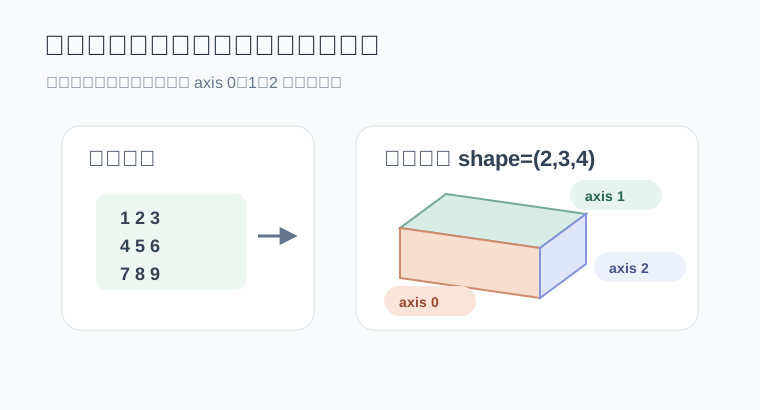
可以这样读:
```text
axis 0:有 2 个大块
axis 1:每个大块里有 3 行
axis 2:每一行里有 4 列
```
也就是:
```text
shape = (axis 0 的长度, axis 1 的长度, axis 2 的长度)
```
把数组打印出来会更直观:
```python
print(x)
```
结果类似:
```text
[
[[ 0 1 2 3]
[ 4 5 6 7]
[ 8 9 10 11]]
[[12 13 14 15]
[16 17 18 19]
[20 21 22 23]]
]
```
外面有两个大块,所以 `axis 0` 的长度是 `2`。每个大块里有三行,所以 `axis 1` 的长度是 `3`。每行四个数,所以 `axis 2` 的长度是 `4`。
## `transpose` 的规则:新轴从哪里拿
NumPy 官方文档里说,`numpy.transpose(a, axes=None)` 会返回轴被置换后的数组;如果指定 `axes`,它必须是所有轴编号的一种排列。更关键的一句是:结果的第 `i` 个轴来自输入数组的 `axes[i]` 那个轴。
翻成大白话:
```text
np.transpose(x, (1, 0, 2))
新 axis 0 = 旧 axis 1
新 axis 1 = 旧 axis 0
新 axis 2 = 旧 axis 2
```
所以原始 `x.shape = (2, 3, 4)`,转完以后就是:
```text
(3, 2, 4)
```
不是玄学,也不是把数字胡乱洗牌,只是照着 `axes` 指定的顺序重新拿轴。
## 几个常见写法拆开看
先保留原样:
```python
y = np.transpose(x, (0, 1, 2))
print(y.shape)
```
输出:
```text
(2, 3, 4)
```
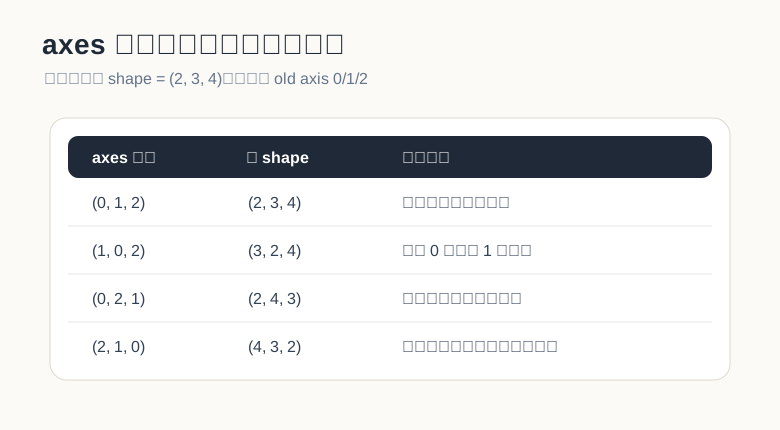
`(0, 1, 2)` 表示新轴顺序和旧轴顺序完全一致,所以形状不变。
再换前两个轴:
```python
y = np.transpose(x, (1, 0, 2))
print(y.shape)
```
输出:
```text
(3, 2, 4)
```
这个写法可以理解成:原来的“行轴”被提到最外面,原来的“大块轴”被放到第二层。
再看 `(0, 2, 1)`:
```python
y = np.transpose(x, (0, 2, 1))
print(y.shape)
```
输出:
```text
(2, 4, 3)
```
这很像“每个大块内部做二维转置”:最外层的大块数量还是 `2`,但每个大块里从 `3 × 4` 变成 `4 × 3`。
最后看一个完全倒过来的:
```python
y = np.transpose(x, (2, 1, 0))
print(y.shape)
```
输出:
```text
(4, 3, 2)
```
原来的列轴被拿到最外面,原来的大块轴被放到最里面。`np.transpose(x)` 在不写 `axes` 时,默认就是把轴顺序倒过来。
## 别把 `reshape` 和 `transpose` 混在一起
`reshape` 是换形状,`transpose` 是换轴顺序。
```python
a = np.arange(6).reshape(2, 3)
print(a)
print(a.reshape(3, 2))
print(a.T)
```
输出大概是:
```text
[[0 1 2]
[3 4 5]]
[[0 1]
[2 3]
[4 5]]
[[0 3]
[1 4]
[2 5]]
```
`reshape(3, 2)` 是按原来的数据顺序重新塞进新形状里;`a.T` 是二维矩阵的行列互换。结果不一样,含义也不一样。
到了三维也是同样的道理。想换轴,用 `transpose`;只是想改成另一个形状,用 `reshape`。这两个动作不要互相冒充。
## `numpy.transpose` 的几种写法
NumPy 里常见写法有三种:
```python
np.transpose(x, (0, 2, 1))
x.transpose(0, 2, 1)
x.transpose((0, 2, 1))
```
它们表达的是同一件事:把原来的 `axis 2` 放到新的第二个位置,把原来的 `axis 1` 放到新的第三个位置。
如果是二维矩阵,还可以写:
```python
a.T
```
但高维张量里,建议明确写出 `axes`。因为 `x.T` 对高维数组会直接倒置全部轴,读代码的人不一定能马上看出你的意图。
## Keras 的 `permute_dimensions`
Keras 后端里的写法很像 NumPy:
```python
import tensorflow as tf
from tensorflow.keras import backend as K
x = tf.reshape(tf.range(24), (2, 3, 4))
y = K.permute_dimensions(x, (0, 2, 1))
print(y.shape)
```
输出:
```text
(2, 4, 3)
```
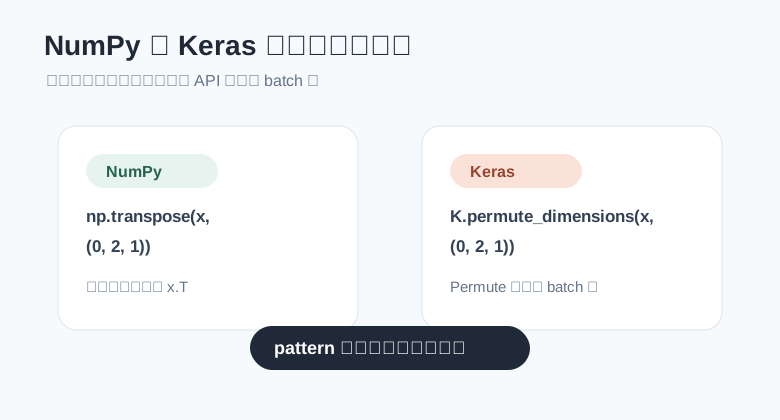
这里的 `pattern=(0, 2, 1)` 和 NumPy 的 `axes=(0, 2, 1)` 是同一个思路:
```text
新 axis 0 = 旧 axis 0
新 axis 1 = 旧 axis 2
新 axis 2 = 旧 axis 1
```
## `K.permute_dimensions` 和 `layers.Permute` 有个小差别
这里容易踩坑。
`K.permute_dimensions` 是后端函数,写的是完整张量的轴编号,通常从 `0` 开始:
```python
K.permute_dimensions(x, (0, 2, 1))
```
但 `tf.keras.layers.Permute` 是一个层,它的 `dims` 不包含 batch 维,并且索引从 `1` 开始。
比如输入形状不含 batch 是:
```text
(10, 64)
```
使用:
```python
from tensorflow.keras import layers
layer = layers.Permute((2, 1))
```
输出就会从:
```text
(batch, 10, 64)
```
变成:
```text
(batch, 64, 10)
```
记住这句话就行:
```text
后端函数:完整轴编号,从 0 开始
Permute 层:不写 batch 轴,从 1 开始
```
## 在 Attention 里为什么经常转最后两个轴
自注意力里经常会看到这种形状:
```text
(batch, heads, seq_len, depth)
```
其中:
- `batch` 是批大小
- `heads` 是注意力头数量
- `seq_len` 是序列长度
- `depth` 是每个头里的向量维度
如果要做 `Q` 和 `K` 的矩阵乘法,常见操作是把 `K` 的最后两个轴交换:
```python
import tensorflow as tf
batch = 2
heads = 4
seq_len = 5
depth = 8
q = tf.random.normal((batch, heads, seq_len, depth))
k = tf.random.normal((batch, heads, seq_len, depth))
k_t = tf.transpose(k, perm=(0, 1, 3, 2))
scores = tf.matmul(q, k_t)
print(k_t.shape)
print(scores.shape)
```
输出形状是:
```text
(2, 4, 8, 5)
(2, 4, 5, 5)
```
这行最关键:
```python
k_t = tf.transpose(k, perm=(0, 1, 3, 2))
```
它没有动 `batch` 和 `heads`,只把最后两个轴从:
```text
(seq_len, depth)
```
换成:
```text
(depth, seq_len)
```
这样 `q` 的最后一维 `depth` 就能和 `k_t` 的倒数第二维 `depth` 对齐,矩阵乘法就顺了。
## 图像通道转换也是同一个套路
图像里也经常碰到轴置换。
比如一张图片是:
```text
(height, width, channels)
```
有些框架或模型希望它变成:
```text
(channels, height, width)
```
NumPy 写法就是:
```python
import numpy as np
image_hwc = np.random.rand(224, 224, 3)
image_chw = np.transpose(image_hwc, (2, 0, 1))
print(image_chw.shape)
```
输出:
```text
(3, 224, 224)
```
读法依然是那一句:
```text
新 axis 0 = 旧 axis 2
新 axis 1 = 旧 axis 0
新 axis 2 = 旧 axis 1
```
## 一个小工具:直接打印轴置换后的形状
如果你容易绕,可以写个小函数,把 `axes` 的效果打印出来:
```python
def explain_permute(shape, axes):
if sorted(axes) != list(range(len(shape))):
raise ValueError("axes 必须是所有轴编号的一种排列")
new_shape = tuple(shape[i] for i in axes)
print(f"old shape: {shape}")
print(f"axes: {axes}")
print(f"new shape: {new_shape}")
for new_axis, old_axis in enumerate(axes):
print(f"新 axis {new_axis} 来自旧 axis {old_axis}")
explain_permute((2, 3, 4), (1, 0, 2))
```
输出:
```text
old shape: (2, 3, 4)
axes: (1, 0, 2)
new shape: (3, 2, 4)
新 axis 0 来自旧 axis 1
新 axis 1 来自旧 axis 0
新 axis 2 来自旧 axis 2
```
这个函数没有什么高深技巧,但特别适合调试模型里的维度错误。
## 转置返回的是视图吗
NumPy 的 `transpose` 通常会返回原数组的视图,也就是不立刻复制底层数据。它只是换了一套观察数据的方式。
可以这样验证:
```python
x = np.arange(6).reshape(2, 3)
y = x.T
y[0, 1] = 99
print(x)
```
输出:
```text
[[ 0 1 2]
[99 4 5]]
```
如果后续代码需要连续内存,可以显式复制一份:
```python
y = np.ascontiguousarray(x.T)
```
这不是每次都必须做,但在性能敏感的数组计算里值得留意。
## 小结
`numpy.transpose` 和 `K.permute_dimensions` 的核心都很简单:给定一个轴排列,然后按照这个排列生成新的张量视图。
遇到 `axes=(0, 1, 3, 2)` 这种写法,不要硬背,直接按下面这句读:
```text
新 axis i = 旧 axis axes[i]
```
三维数组、图像通道转换、Attention 里的 `QK^T`,本质都是同一个动作:把轴换到计算需要的位置。只要先把每个轴代表什么写清楚,维度转置就会从“看着头疼”变成“照表拿轴”。